


Things that I love about these images - the graphic mix of print, flat, cartoony images, and parts of the body - I really like this combo of different styles. Very cool.

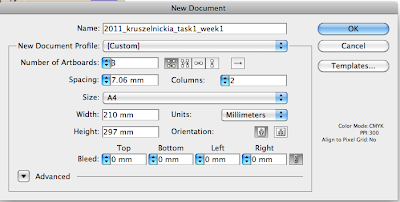

 Remember to keep in CMYK

 this keeps the setup of the illustrator how we want them.


 http://www.mariezucker.com
Throughout weeks 1-5 you will be introduced to layout design to create a stylised research proposal. You will recap Illustrator to create your digital work.
You have been asked to create a research document that reflects your own personal illustration interests and present it in a visual style that reflects the research you have done.
You will need to:
Contemplate, analyse and develop a research document that explores the work of 3 illustrators and/or fashion photographers.
Create a written and visual document (1000 words, unlimited images), that analyses and explores your chosen artists. Incorporate responses to the questions below as well as including visual research to support your ideas.
Name and bio Describe the chosen artists visual style? What materials and processes are visible in their work? What demograpic is their work aimed at? What inspires their practice? What appeals to you about their work?
Demonstrate competence in specific skills and techniques taught in digital workshops
Use the research from your document as a basis to create a A5 6 page document to display this information. Consider how various elements such as font selection, choice of colour and graphic style combine together to form a visually engaging document. One side of the page will be used to display imagery, whilst the other will be used to display the written content. Be creative in your approach to the design of this document and think about visual consistency and visibility.
Communicate concepts clearly and effectively through a digital process
Inspired by your chosen artists, create 2 x Fashion illustrations to also reside in your document. This can be a combination of digital and hand generated effects or purely digital. Create these as an A3 document as you will also be required to turn this into an A3 poster later in the semester.
Demonstrate appreciation of planning and technical progression throughout the assessment period
Create a multi page digital PDF of your submission.
OUTCOMES
• • • • •
Advanced drawing techniques Personal style in Illustration Advanced design and layout Advanced digital presentation skills Confident & competent computer file management & project scheduling
ITEM SPECIFICATIONS
Digital submissions of your research document and poster.
Please submit the digital component of your assignment to the Digital Dropbox by the specified submission due date and time.
SUBMISSION DATE: 11.30am Week 6
SUBMISSION REQUIREMENTS
- press ready pdf files of all printed work - 2 x A3 digital posters
- Submit files on CD and to the Dropbox
- All print copies, CDs and files must be clearly identified with your name eg. 2011_lastnameinitial_task1.pdf
- Do not burn your CD until the final checking, completed in class, has been completed and any errors remedied
ASSESSMENT CRITERIA
- Clarity, insight, articulation and visual effectiveness of research document
- Visual effectiveness and technical competence of A3 posters
- Class participation, professionalism and ability to meet scheduled deadlines
- Management of digital files
ASSESSMENT WEIGHTING: 25% of subject grade
NOTES ON THIS PROJECT
Stylised research proposal that relates to drawing and illustrator. Reflects your personal interests, heaps of research to do. Explore the work of 3 illustrators or fashion photographers - work out who you are interested in, why and how they inspire you, what it is that interests you. 1000 words to explain this. Be very succinct and draw out the important details. What it is that they do, and why you're interested in this. Think about layout, and how you can make this an interesting document. Has to be dynamic, combine image and text. This is the research, start in word, translate to illustrator.
Name of the artist - small bio about what they do - not birth date etc. General idea of who they are. Describe their visual style in your words, what materials and processes they use - found objects, textiles, collage etc. What demographic are they aiming their work to? High end fashion? More artistic? What inspires their practice? What is it that appeals to you about their work? Use this written research, but make sure that you use lots of images. MAKE SURE YOU HAVE DETAILS ABOUT EVERY IMAGE! This written research becomes an A5 digital document. We don't print at this point, just get them press ready. 6 A5 pages - small multi page booklets. 3 spreads - 1 spread per illustrator or photographer. One side more image based, one side text based. Or combine for text to work with images?
Consider FONT! Reflect the style of the people you're researching, as well as your own style. Consistency throughout the document - create a template, use the same font and colours.
We're creating 2 fashion illustrations inspired by the artist - but not creating a replica! Taking inspiration and turning it into something unique. These are made at A3 size, can print and use as a poster, but we'll shrink this down to fit into the booklet. These don't go into the document until later. Can be a combo of hand drawn or digital, or can be entirely digital. But bear in mind that this should be 50% or more digital. Submitted as a multi page PDF.
Advanced drawing and illustration skills. Being confident with file management. Label files with your full name.
Examples of fashion illustrations - think about background as well as foreground, use symbols to make illustrations.
Bear in mind that every time that you log out, the computer wipes everything from the desktop. Save a million times.
Try to have a back up copy before using the computers at the printing place downstairs - corrupts a lot of files.


 My attempt at making a suit that would fit into the Christopher Kane Spring 2010 collection.


